Installing CUDA for Hashcat on Ubuntu: from NVIDIA driver to a working speed benchmark
A step-by-step guide to setting up NVIDIA CUDA for Hashcat password cracking on Ubuntu.

This short tutorial covers how to install NVIDIA drivers and CUDA toolkit to run Hashcat with NVIDIA GPU acceleration.
Install Hashcat
Upgrade your system:
1
sudo apt update && sudo apt upgrade -y
The easiest way in Ubuntu is to install Hashcat directly from the repositories:
1
sudo apt install hashcat
Install NVIDIA Graphics Driver
Install the NVIDIA graphics driver. The following command lists available alternatives:
1
sudo ubuntu-drivers devices
Output:
1
2
3
4
5
6
7
8
9
10
11
12
13
14
15
16
17
18
19
20
21
== /sys/devices/pci0000:00/0000:00:01.1/0000:01:00.0 ==
modalias : pci:v000010DEd00001F99sv000017AAsd00003A43bc03sc00i00
vendor   : NVIDIA Corporation
model    : TU117M
driver   : nvidia-driver-535 - third-party non-free
driver   : nvidia-driver-470-server - distro non-free
driver   : nvidia-driver-525-server - distro non-free
driver   : nvidia-driver-535-server - distro non-free
driver   : nvidia-driver-550 - third-party non-free recommended
driver   : nvidia-driver-535-server-open - distro non-free
driver   : nvidia-driver-545 - third-party non-free
driver   : nvidia-driver-450-server - distro non-free
driver   : nvidia-driver-525 - third-party non-free
driver   : nvidia-driver-520 - third-party non-free
driver   : nvidia-driver-550-open - third-party non-free
driver   : nvidia-driver-515 - third-party non-free
driver   : nvidia-driver-535-open - distro non-free
driver   : nvidia-driver-470 - distro non-free
driver   : nvidia-driver-545-open - distro non-free
driver   : nvidia-driver-525-open - distro non-free
driver   : xserver-xorg-video-nouveau - distro free builtin
Choose the latest version, in this case nvidia-driver-550:
1
driver   : nvidia-driver-550 - third-party non-free recommended
Install the driver:
1
sudo apt install nvidia-driver-550
Install CUDA Toolkit
Download and install the CUDA toolkit. Refer to the official CUDA downloads page for the latest version.
1
2
3
4
wget https://developer.download.nvidia.com/compute/cuda/repos/ubuntu2204/x86_64/cuda-keyring_1.1-1_all.deb
sudo apt install ./cuda-keyring_1.1-1_all.deb
sudo apt update
sudo apt install cuda-toolkit-12-4
Add CUDA to your PATH by adding the following to .bashrc or .zshrc:
1
2
export PATH=/usr/local/cuda/bin${PATH:+:${PATH}}
export LD_LIBRARY_PATH=/usr/local/cuda-12.4/lib64\${LD_LIBRARY_PATH:+:${LD_LIBRARY_PATH}}
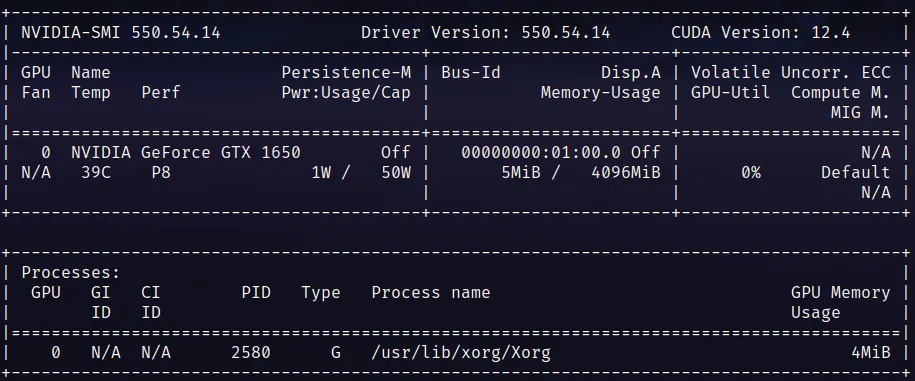
Reboot the system, then verify the installation with nvidia-smi. The CUDA version should be displayed:
Verify CUDA installation:
1
nvcc -V
Expected output:
1
2
3
4
5
nvcc: NVIDIA (R) Cuda compiler driver
Copyright (c) 2005-2024 NVIDIA Corporation
Built on Tue_Feb_27_16:19:38_PST_2024
Cuda compilation tools, release 12.4, V12.4.99
Build cuda_12.4.r12.4/compiler.33961263_0
export PATH=/usr/local/cuda/bin${PATH:+:${PATH}} export LD_LIBRARY_PATH=/usr/local/cuda-12.4/lib64${LD_LIBRARY_PATH:+:${LD_LIBRARY_PATH}}
1
2
3
4
5
6
7
8
9
Reboot the system, and after this execute `nvidia-smi`, to verify the correct installation, CUDA Version should look like the following image

**Output**
```shell
nvcc -V
Finally, you should be able to execute
1
2
3
4
5
nvcc: NVIDIA (R) Cuda compiler driver
Copyright (c) 2005-2024 NVIDIA Corporation
Built on Tue_Feb_27_16:19:38_PST_2024
Cuda compilation tools, release 12.4, V12.4.99
Build cuda_12.4.r12.4/compiler.33961263_0
Testing Hashcat
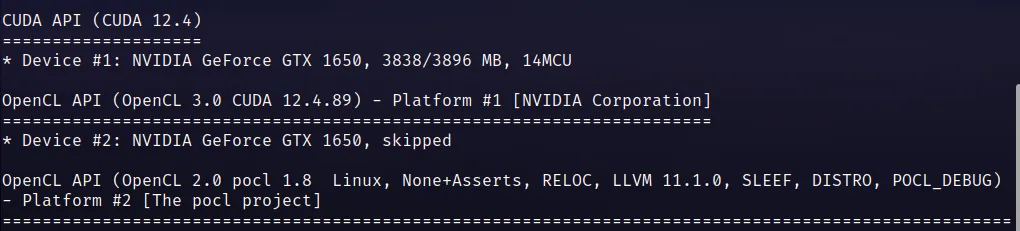
Verify Hashcat now runs without errors using GPU acceleration:
1
hashcat --benchmark